32 card types, auto-detected
Aadhaar, PAN, Voter ID, driving licence, ration card, Norka, Medisep and more are built in. Drop the file — the type is recognised.
PVC Card Printer reads your PDF or image, recognises the card type, crops front and back exactly and builds sheets for your PVC printer. 32 ready card types, works fully offline, in English, Malayalam and Hindi.
Windows 10 / 11 · 64-bit
Aadhaar, PAN, Voter ID, driving licence, ration card, Norka, Medisep and more are built in. Drop the file — the type is recognised.
Add many files, pick a sheet design, then build sheets — save as PDF or images, or print straight from the app.
91×297 and 105×297 mm strips, two-sided duplex with flip, and a calibration sheet to line up your printer exactly.
Extra white border, brightness, contrast, black & white and sharpen — save it for a card type or for this file only.
Documents are processed only on your computer. Nothing is uploaded and there is no analytics. Activation is a key you paste — no internet needed.
The app itself runs in all three languages, and we support you on WhatsApp and phone.
PVC Card Printer is a Windows program that turns the PDFs and scans of Aadhaar, PAN, driving licence, RC book, ration card, voter ID, health cards and many more documents into perfectly cut, perfectly placed PVC-card print sheets. You drop the file in; the app finds the card, crops the front and the back, places them on your chosen paper and gives you a PDF or a direct print.
It is built for Akshaya centres, CSC counters, photo studios and print shops that make PVC cards every day — so every step is designed to save minutes: automatic card recognition, ready-made sheet layouts, a calibration sheet for your printer and a 15-day full-access trial.
Real screens from PVC Card Printer. Personal details in the pictures are hidden.
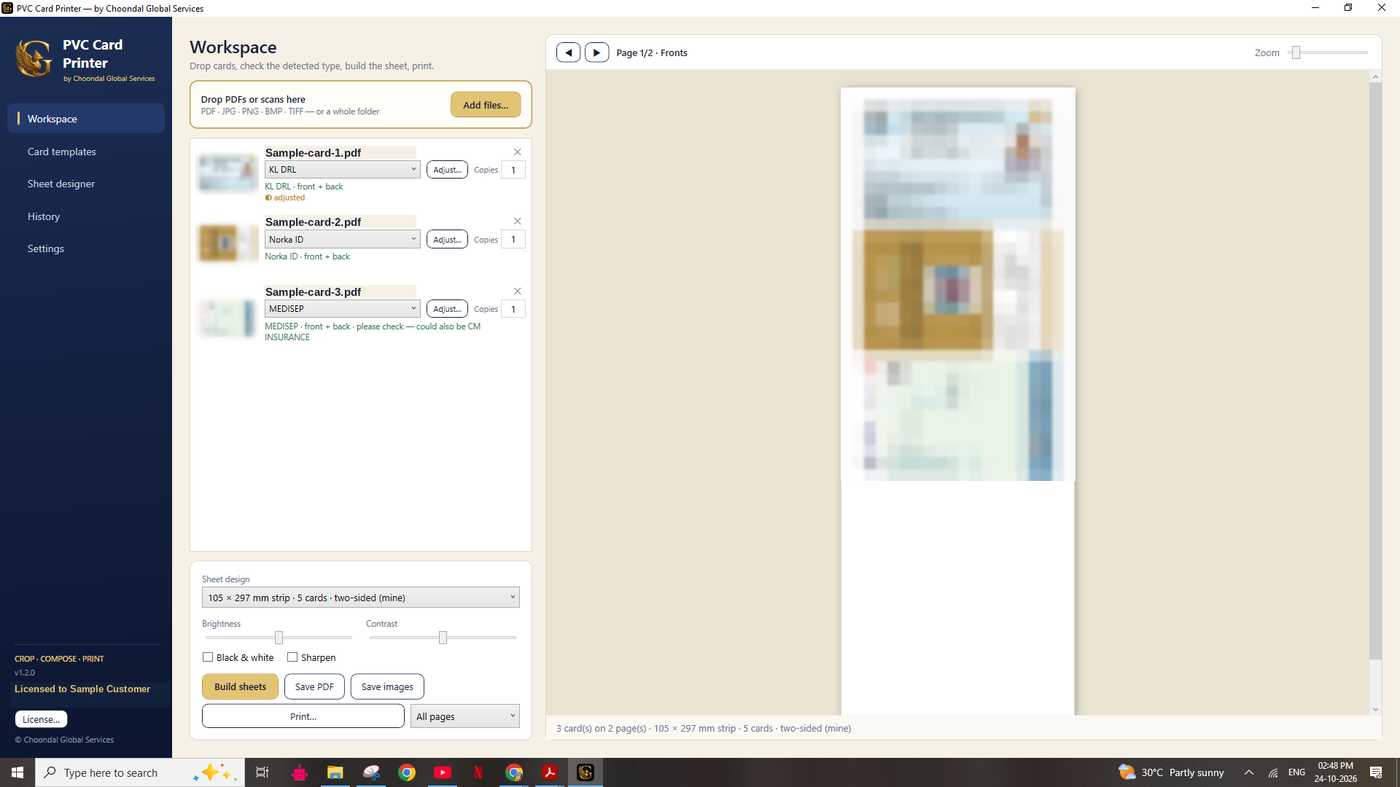
Drag PDFs, JPG, PNG, BMP or TIFF files (or a whole folder) into the queue. Password-protected PDFs ask for the password. Each file shows the detected card type, so you can confirm at a glance, choose the sheet design, set the number of copies and press Build. Save a PDF, save images, or print only the fronts, only the backs or all pages.
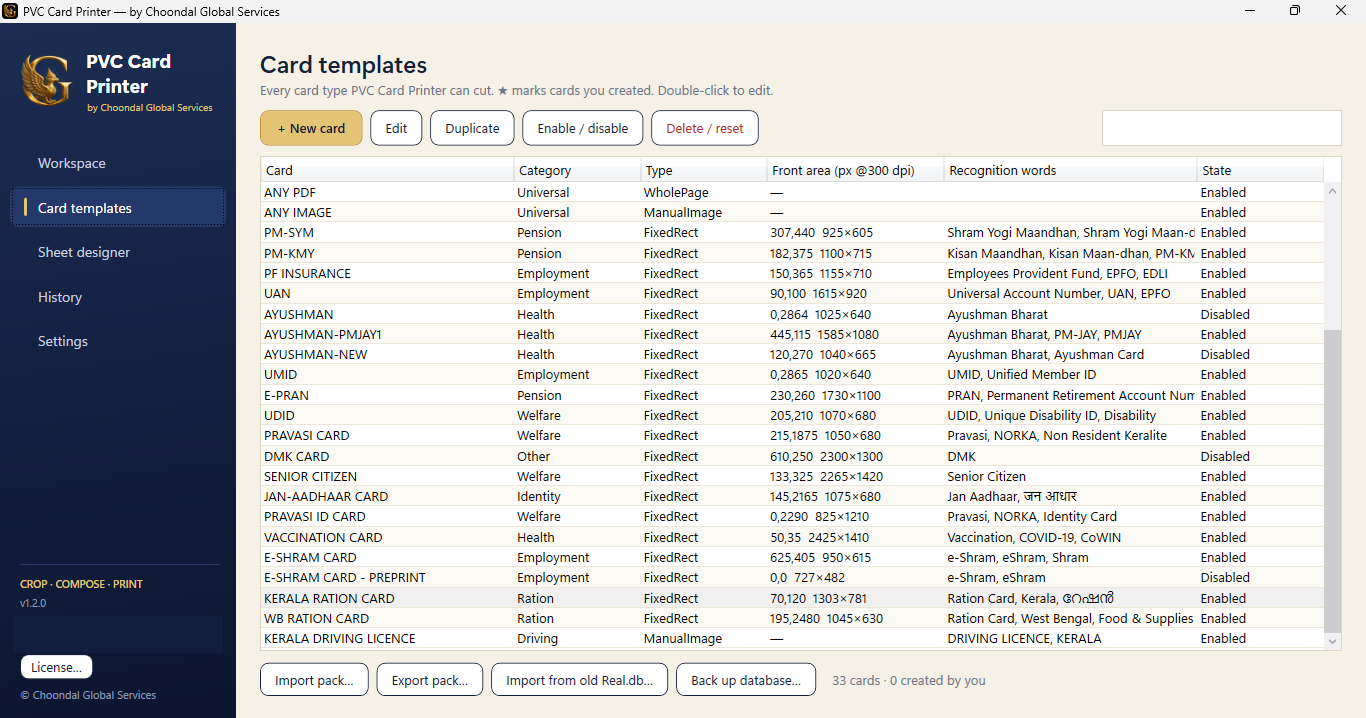
Aadhaar, PAN, voter ID, driving licence, RC, ration card, Farmer card, Ayushman, UHID, Norka, Medisep and more are ready. Each template stores where the front and the back sit on the page and the words that identify the document, which is how the app recognises it. See the full list in the app’s Card templates screen.
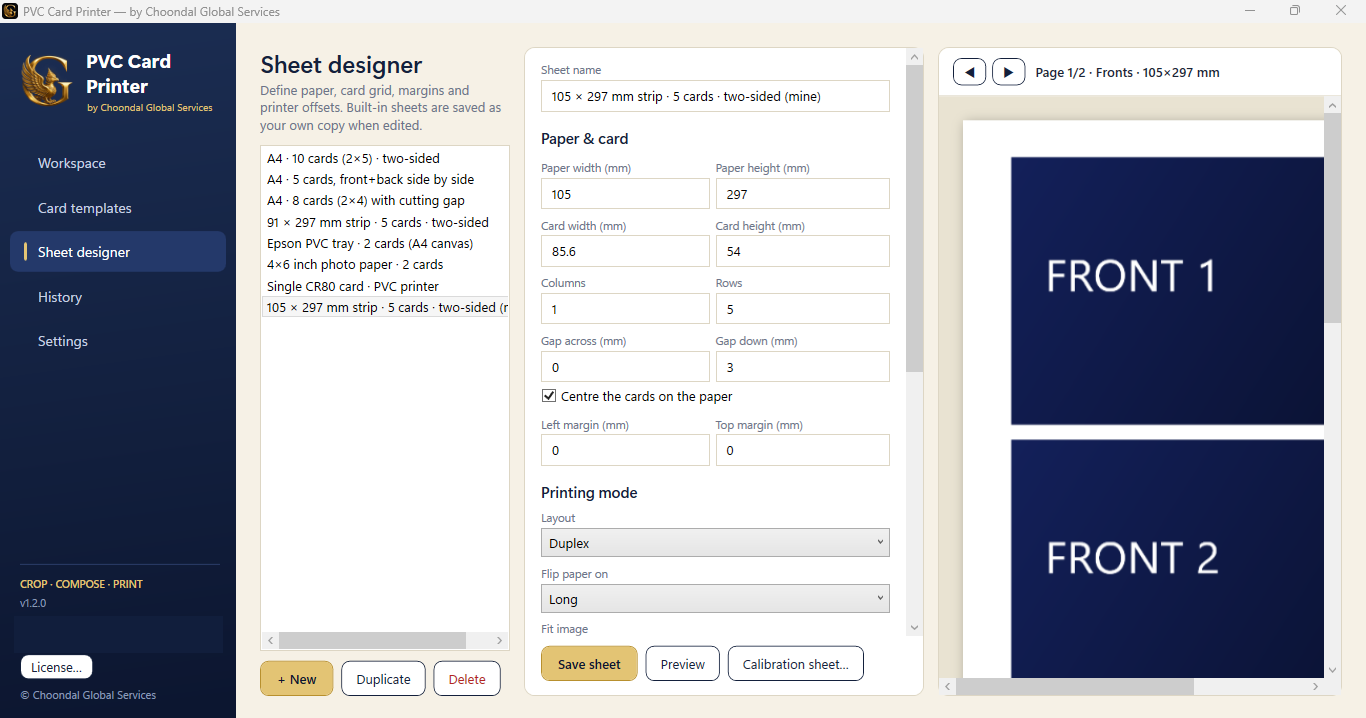
Ready layouts: A4 with 10 cards two-sided, A4 with 8 cards and cutting gap, 91 × 297 mm and 105 × 297 mm strips, Epson PVC tray, 4 × 6 inch photo paper and a single CR80 card. Change paper size, card size, columns, rows, gaps, margins, duplex flip edge and printer offsets, and watch the live preview. Print a calibration sheet to fix any printer drift.
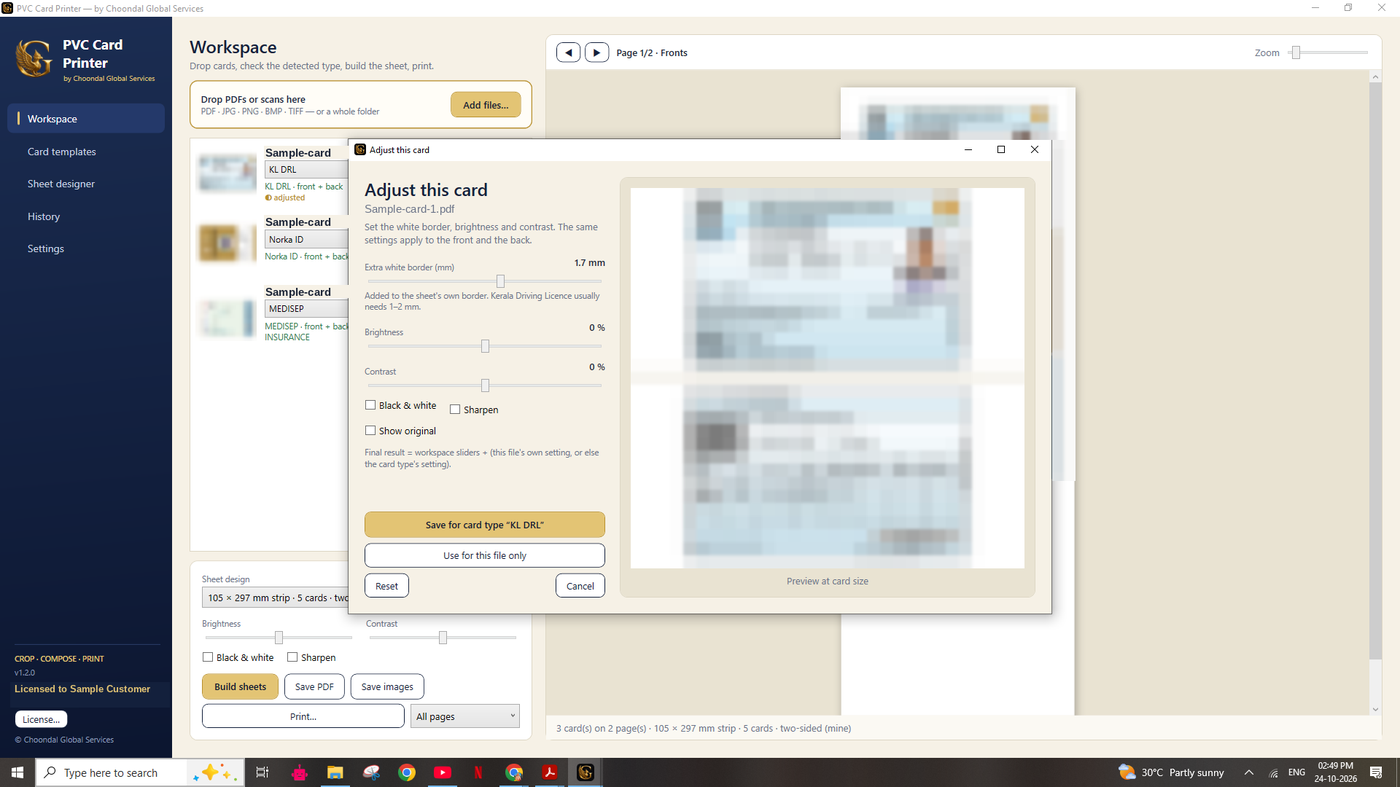
Set the white border, brightness, contrast and sharpness per card type, and nudge the crop in millimetres — for example the 1.5 mm fix for Kerala driving licences. Settings are saved in your profile and used every time that card appears.
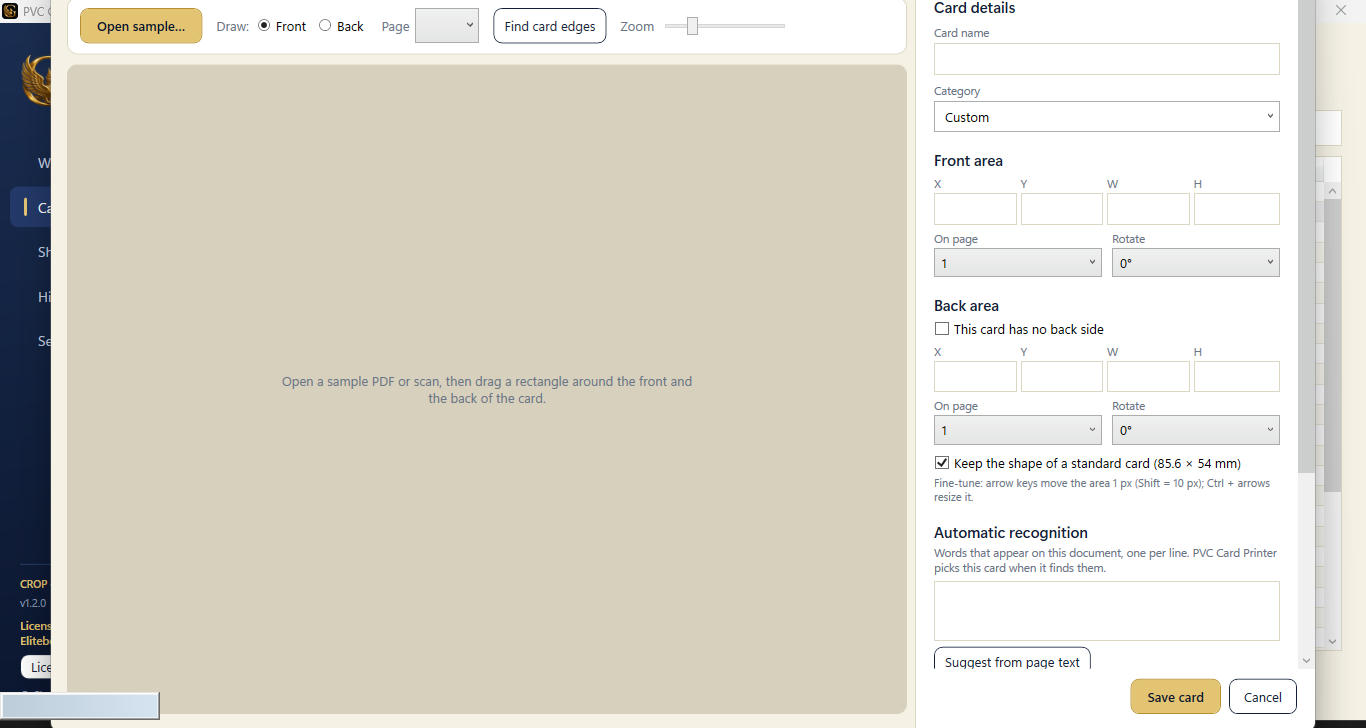
A new card type from a state, a department or a new scheme? Open a sample PDF or scan, draw a rectangle round the front and the back, add recognition words, press Test cut and save. From then on it is auto-detected like the built-in cards. You can also edit, duplicate and import card types.
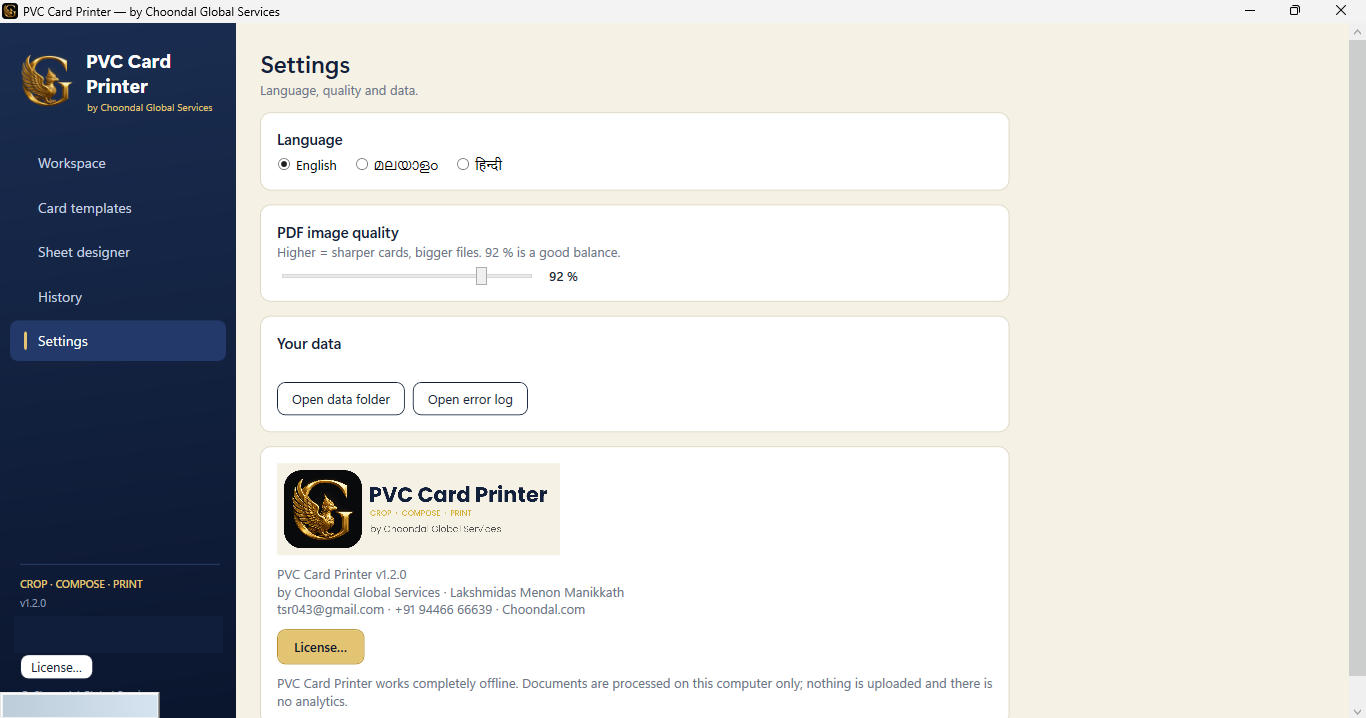
Switch the app between English, Malayalam and Hindi, choose the PDF image quality (92 % is a good balance of sharpness and file size), open the data folder or the error log, and review earlier jobs in History. Everything is processed on this computer: nothing is uploaded and there is no analytics.
Both run every built-in card. The difference is how independent you are when a new card comes.
| Feature | Standard | Pro Recommended for shops |
|---|---|---|
| 32+ built-in card types with auto-detect | ✓ | ✓ |
| Batch queue | Up to 10 files | Unlimited |
| Ready sheet layouts (A4, strips, Epson tray, 4×6, CR80) | ✓ | ✓ |
| Calibration sheet and printer offsets | ✓ | ✓ |
| Per-card adjust (border, brightness, contrast, sharpen) | ✓ | ✓ |
| Password-protected PDFs · 3 languages · works offline | ✓ | ✓ |
| Create and duplicate your own sheet designs | — | ✓ |
| Add, edit, duplicate and import card types (Add-Card wizard) | — | ✓ |
When you install the app you get 15 days with every Pro feature open. Use this time to adjust the cards you need and save them in your profile.
If you then buy Standard, the cards you saved keep working. What Standard does not allow is adding or editing new card types.
We recommend Pro: you stay independent — add any new PDF card whenever it appears and print it at your own quality, without waiting for anyone.
PVC Card Printer prints through the standard Windows print dialog, so it works with any printer that has a Windows driver.
Print on A4 and cut, or use any printer you already own. Duplex layouts work with automatic or manual two-sided printing.
Built-in layouts for inkjet printers with a PVC tray (Epson tray layout) and for single CR80 cards on PVC card printers. Use the Sheet designer to match your tray exactly.
A4 · 105 × 297 mm and 91 × 297 mm strips · 4 × 6 inch photo paper · CR80 (85.6 × 54 mm) card. Custom sizes can be set in Sheet designer (Pro), limited by what your printer driver accepts.
Every printer feeds paper slightly differently. Print the calibration sheet, measure the shift and enter the offsets — then every sheet lands exactly on the card.
Results depend on your printer model and driver. Test on plain paper with the calibration sheet before using PVC.
One license = one computer. Pay once or renew yearly. A 15-day free trial (with all Pro features) is built into the app.
Step-by-step guides in English, Malayalam and Hindi.
No tutorial matches your search.
Enter the e-mail and order number from your purchase e-mail to see your code, downloads and re-issue.
Install and open the app: you get 15 days with all Pro features, no code needed. After that, activate with a license key.
Yes. The app is signed by Choondal Global Services with its own certificate, which Windows does not know yet. Click “More info” → “Run anyway”, or install the included certificate file.
Any printer that has a Windows driver — inkjet, laser or PVC card printer. Layouts for A4, strips, Epson PVC tray, 4×6 and CR80 are built in. Always test one sheet on plain paper first.
No. Standard runs all built-in cards and the cards you saved during the trial, but adding or editing card types needs Pro. If you will meet new documents, choose Pro.
Yes. They stay in your profile and can be used for printing. Only creating or changing card types is locked.
Cards are processed fully offline on your computer. Nothing is uploaded and there is no analytics. Internet is only used to buy, download and get your licence key.
No. The key is verified on your computer. Internet is needed only to buy and download.
No — a key works on one computer. For a second computer, buy another license.
Your Computer ID changes, so you need a new key. Use “Moved to a new PC?” in My Licence — one re-issue per purchase is free; later ones are ₹200 (contact us).
Renew to continue using the app. Your saved card types, sheets and settings are not deleted.
No. PVC Card Printer is independent software by Choondal Global Services. Using it lawfully is the user’s responsibility.
Akshaya e-Centre TSR043, Choondal Junction, Thrissur, Kerala